What's Inside This Keyword Research Template
Open the file and you'll see eight tabs, each tab has a job, and you can start using the workbook without learning a complicated system first. You can research, sort, compare, prioritize, and plan without jumping between different files or losing the reasoning behind your keyword choices.
First Two Tabs: Start Here and Dashboard
Start Here is your first stop. It explains the purpose of each tab, the color coding, and what you need to enter. You can quickly see which cells require your input and what the different status and priority colors mean.
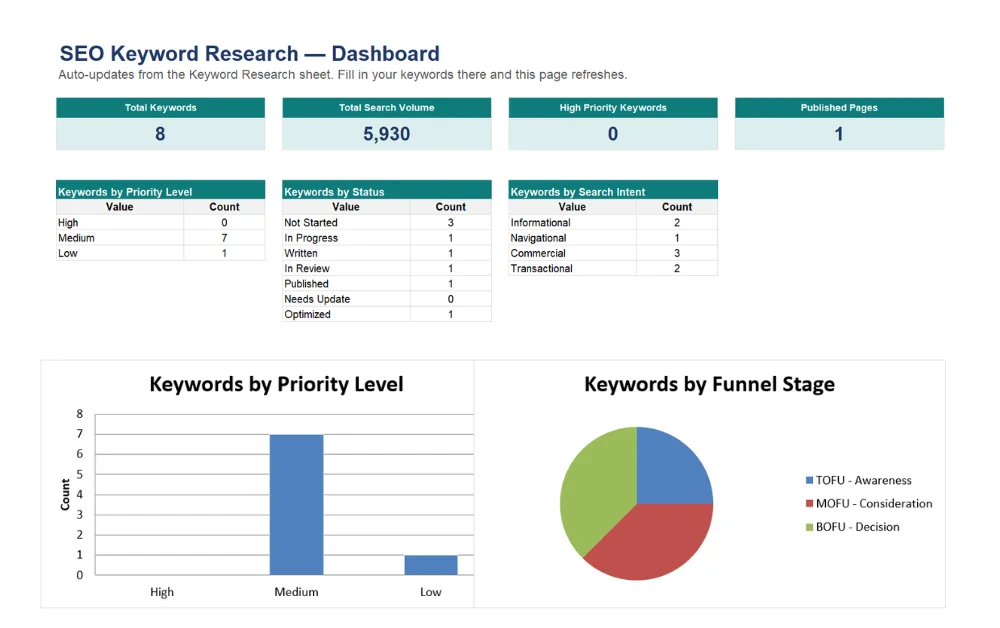
Dashboard gives you the bigger picture. As you fill data to the research sheet, it updates automatically with total keywords, combined search volume, how many are marked high priority, how many pages are actually published, plus a breakdown by status, intent and funnel stage with charts that update live.
The Keyword Research Sheet
Add your keywords, search volume, keyword difficulty, CPC, search intent, funnel stage, SERP features, target page, content type, status, owner, due date, and notes.
The Priority Score helps you decide which terms deserve attention first. It combines key metrics into a score from 0 to 100 and assigns a High, Medium, or Low priority automatically.
It’s an important metric because search volume does not tell the whole story. A lower volume keyword with strong commercial intent can be more valuable than a high volume term that attracts little business value.
Keyword Clustering Tab
Once you have a working list, the next step is grouping related keywords. Put closely related queries under one main topic, add supporting long tail terms, and see the combined search volume for the cluster. It gives you a better basis for deciding what belongs on one page and what deserves separate coverage. It can also help reduce keyword overlap and create stronger topical coverage.
Competitor Gap Analysis
Lets you study the pages already ranking for your important keywords. Add up to three competitors and record their positions for each term. The patterns can reveal missing topics, weak results, crowded SERPs, and opportunities worth investigating before you commit resources to a page.
Content Calendar
A keyword without a publish date is just an idea. In this tab, Add the content type, writer, word count target, due date, publish date, and current status. Overdue items are flagged automatically, making unfinished work easier to catch.
On Page SEO Checklist
Once content is written, the final step is checking the page before publication. Check the title tag, meta description, H1, headings, internal links, image alt text, schema, indexing, mobile experience, and other important on page elements.
Glossary
It keeps the workbook easy to use for everyone on the team. It explains terms such as CPC, SERP features, keyword difficulty, search intent, and other SEO language used throughout the template in simple terms.